Web Gateway in practice · Part 1
The Proxy That Became the Application

 Martin Stecher
September 3, 2026
Martin Stecher
September 3, 2026
I needed a small private web service: personalized pages for a closed list of people, simple forms, several languages and individual email invitations. I expected Web Gateway to protect or proxy such an application. Instead, it turned out to be the application.
A small problem with a surprisingly long wish list
The service was only intended for a few dozen invited users. Each person should receive an individual link, open a personalized page in a preferred language, submit a response and return later to change it. The wording had to adapt to both the recipient and the chosen language. The same service should also send the invitations via email.
Although the audience was small, the public-facing requirements were real: a specific new subdomain, of course with a valid TLS certificate. And after my research into HTTP/3, I knew that I wanted to support the whole HTTP family.
So the decision to use Web Gateway as the frontend was made early. Initially, I assumed that the solution would involve a web framework, an application server, a database and maybe additional components. That would have meant all the setup work, updates and monitoring. It felt disproportionate to the problem.
Maybe I should just use an existing cloud offering instead? There are many RSVP services, but none delivered exactly what I wanted, and they felt expensive.
The moment the proxy became the application
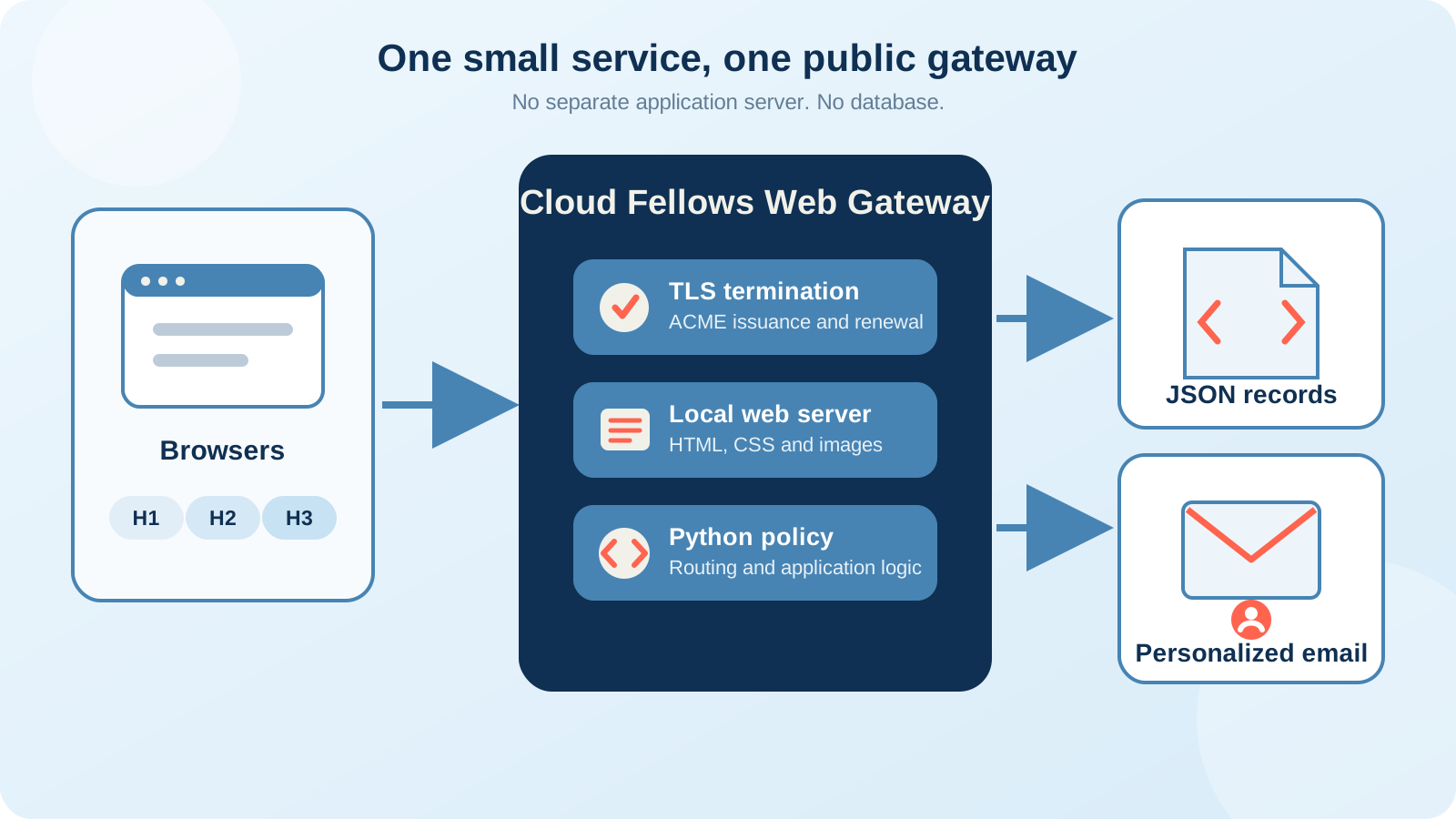
The complete service: one public gateway, ordinary templates and one small JSON data file. Click to enlarge.
Web Gateway had originally been designed primarily as a proxy. But a gateway already has to understand requests, select hosts, terminate TLS and apply policy. Early on, we also allowed it to run in web server mode. But the key difference from a normal proxy is Web Gateway's policy engine: the ability to run Python code at well-defined points in an HTTP transaction.
Put those capabilities together and the shape changes. Static HTML and CSS can come directly from the local file server. A Python policy can recognize a personal URL, load the matching record, render a form, validate the submitted response and generate the next page. No separate application process has to sit behind the gateway. And, as a bonus feature, Web Gateway's policy engine can even send email notifications!
Three HTTP generations, one installation
Clients arrive over HTTP/1.1 or HTTP/2 on TCP and over HTTP/3 on QUIC. They all reach the same host, the same files and the same policy decisions. Application logic does not have to care which transport brought the request in.
Web Gateway's ACME client obtains a publicly trusted certificate and monitors it for renewal. That removes a surprisingly awkward operational task from a service that may be small, but still has to behave like a proper Internet site.
This was one of the most pleasant aspects of the deployment: modern protocol support and certificate automation did not require a collection of additional daemons. They were already part of the gateway process. The application itself runs as a single process in one Docker container, accompanied only by a tiny watchdog container that takes care of monitoring.
The policy was all the backend I needed
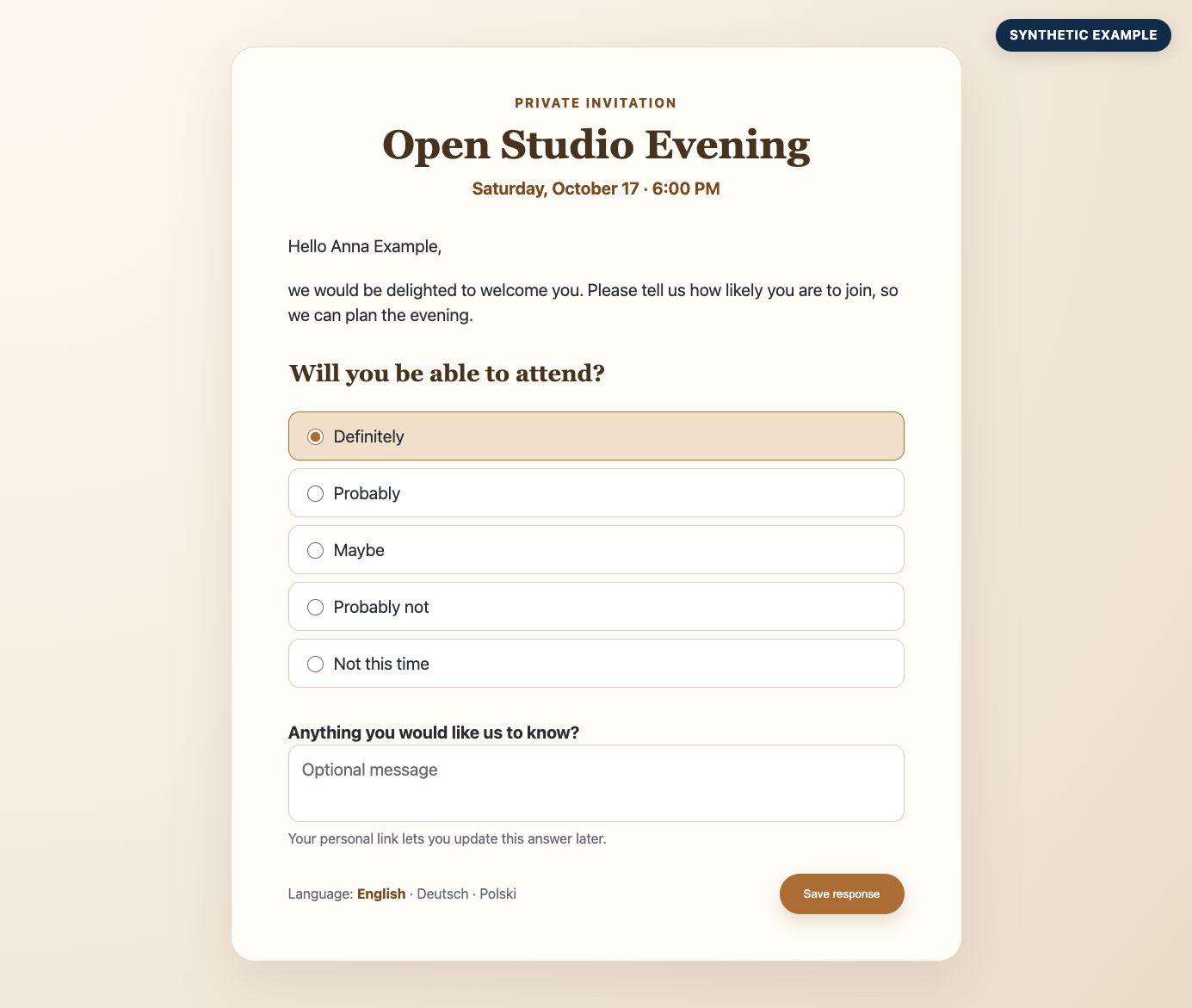
A recreated example using fictional data. Click to enlarge.
A special secret HTTPS URL path acts as my admin login and allows me to send email invitations to the users. The Python policy loads a template and personalizes it with the data in the JSON file. Each recipient gets a nice, personal email with a long random token in the link.
The token identifies one record in the JSON file; there is no public directory and no ordinary username-and-password login. Opening the link is safe and only displays the current form. A change is recorded only when the form is submitted.
The Python policy performs the small amount of application logic the service needs:
- resolve the personal token without exposing an internal identifier
- select the recipient's language and personalized wording
- validate form fields before accepting a response
- render a confirmation or the previously saved answer
- attach useful, non-sensitive context to the access log
The human-facing text remains in HTML and email templates rather than being assembled in Python. That keeps wording and translation changes separate from request handling. The pages do not need a JavaScript application; ordinary HTML forms are enough.
One JSON file, not one database too many
The records fit naturally into a single JSON document: one object per invited person, containing the personal token, language, a few presentation choices and the current response. Updates are serialized and written by replacing the file atomically, so an interrupted write cannot leave a half-written document behind.
Would a database also work? Certainly. It would provide capabilities this service did not need, while adding another service, another set of credentials, a schema and a backup procedure. At this scale, the JSON file is not a shortcut around a missing design. It is the right-sized persistence layer.
What the deployment contains
| Need | Implementation |
|---|---|
| Public HTTP service | One Web Gateway binary |
| HTTP/1.1, HTTP/2 and HTTP/3 | Gateway listeners and one common transaction model |
| Trusted TLS certificate | Built-in ACME issuance and renewal |
| Pages and forms | Local files and templates |
| Application logic | Python policy |
| Persistent records | One JSON file |
| Individual invitations | Templates and gateway email integration |
One binary does not mean one opaque blob
The deployment still contains normal, editable files: JSON configuration, Python policy, HTML and email templates, CSS and the records file. They are mounted alongside the Web Gateway binary and can be inspected, backed up or changed independently.
The important difference is operational. There is one public process to install and run, not a chain of web server, application runtime and database services. The files describe the service; the binary supplies the protocol, security and policy machinery.
A deliberately small solution
This architecture is not a claim that every application belongs in a policy script or that JSON should replace databases. If records have relationships, writes become frequent, several users modify shared state concurrently or the business rules keep growing, a real backend earns its place.
That boundary matters. The value here came from recognizing that this particular problem had not crossed it. Starting with a complete application stack would have created more software to operate without making the service more useful.
What surprised me
I began with a product whose primary design goal was proxying web traffic. I ended with a secure, personalized web service that handles three HTTP generations, its own trusted certificate, local content, forms, persistence and individual email - all through one gateway installation.
The best part was not that Web Gateway could be stretched into doing something unusual. It was that every capability used here already belonged naturally at the HTTP boundary. For a small private service, the gateway was not merely in front of the stack. It was the right stack.
This is the small end of the story. Part 2, Enable, Protect and Accelerate a Backend, looks at what changes when one JSON file is no longer enough - and why Web Gateway remains the public front door when a Vue frontend, a Go backend and a database enter the picture.
More information about the product is available on the Cloud Fellows Web Gateway product page.